
For coaches, creatives and service providers who sell online
You’ve written your sales page. But will it actually convince someone to buy?.
Before you publish your sales page or spend another week trying to improve it, find out what your words are really saying to potential buyers. The Sales Page Analyser uses buyer psychology to show you what’s working, what could be putting people off and what to change, one section at a time.
Sound familiar?
You’ve created your offer. But is your sales page doing it justice?
You’ve put time and effort into creating your offer. Now you need a sales page that makes people understand why they should buy it. But how do you know if the words you’ve written are actually doing that job?
People visit your sales page, have a read, and leave without buying.
You’ve read it so many times you can’t tell if it’s any good anymore.
You’ve got a draft sitting in Google Docs, but you’ve no idea if it’s ready to publish.
The words sound like they belong to someone else’s business, not the one you’ve built.
The annoying part is that this is almost impossible to spot from the inside. Your own page is the hardest one to see clearly, however good you are at what you do. I found that out the hard way on mine, and I’ll show you what it picked up further down.
Buyer psychology
Every sales page has a job to do
Each section of your page is quietly answering a question in your buyer’s head.
- Is this for me?
- What exactly am I getting?
- Do I want this?
- Do I believe this?
- Is it worth it?
- What's stopping me?
- What do I do next?
Whether your sales page is already live or you’re still writing it, one of those questions could be going unanswered. The tricky bit is spotting which one when it’s your own words and you’re far too close to them.
That’s buyer psychology in a nutshell, and it’s exactly what the Sales Page Analyser is built around. 🔍
How it works
You open it in your browser, paste in up to 300 words from your sales page, whether it’s already live or still a draft in Google Docs, and it tells you what’s working and what to change.

1
Pick a part of your page
Choose the section you want checked from your live sales page or draft, whether that’s your headline, your offer or your call to action.

Tell it about your offer
Who it’s for, what it is, the price, and what you want readers to do next.
Paste it in
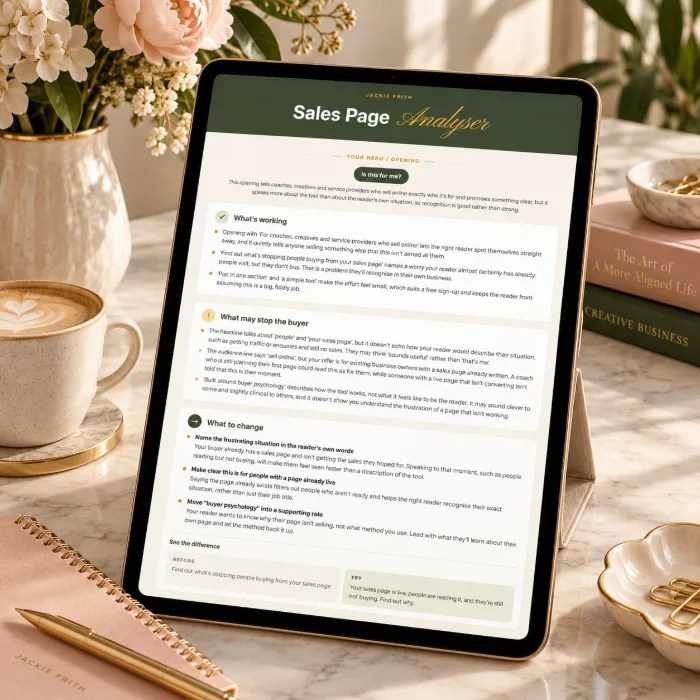
Paste in your words and get back what’s working, what may stop your buyer and what to change, usually within a minute or two.
Inside the Analyser
What you get
Checks for all 8 key sections
Hero, problem, offer, benefits, proof, pricing, objections and your call to action, each judged on its own job.
The buyer question behind every section
Know exactly what each part of your page needs to answer, so you’re not tweaking blindly.
Feedback that fits your offer
It takes into account your buyer, your price and your next step, so a free download and a high-ticket service get very different advice.
Plain-English results
What’s working, what may stop your buyer, and what to change. No jargon, no 20-page report.
Before and after examples
Up to two of your own sentences reworked to show the difference. Everything else stays in your own words.
Use it as often as you like
Make your changes, run it again, and see if you’ve nailed it.
The end result? A sales page where every section answers the question in your buyer’s head, so they’ve got no reason left to click away.
What changes
What it does for you
Imagine looking at your sales page and knowing which parts are doing their job, which need attention and exactly what to improve next. Whether you’re preparing to publish or improving a page that’s already live, you can make changes with confidence instead of second-guessing every word.
Find what’s weakening your sales page
Spot the sections that could be putting buyers off, whether your page is live or still a draft, and focus on fixing those instead of rewriting everything.
Talk to the buyer you have now
Make sure your page speaks to the buyer you want now, not the one you had three years ago, so the right people read it and think “that’s me”.
A short list, not a rewrite
For each section you get a handful of clear changes in plain English. Pick one and make it over a cuppa.
Close the page with confidence
Know what’s working and what needs improving, so you can publish your page or make changes with confidence.
It all starts with one section. Pick the one that’s been bugging you and run it through today.

Real talk
I build sales pages for a living. Here’s what the Analyser spotted on mine. 😬
I assumed my own sales page would pass with flying colours.
It didn’t….ooops
The Sales Page Analyser looked at my hero section and pointed out that my headline was talking to someone just starting out, when the people I actually work with are established business owners who already have offers selling. It also noticed that the one thing they want most, to grow, wasn’t mentioned anywhere.
I hadn’t even spotted it. The feedback came back as a short, plain-English list: what was working, what might be putting my buyer off, and a couple of my own lines reworded so I could see the difference. Here’s one of them:
Before
You’ve got the idea. I build the pieces that help you sell it.
After
Your offer already sells. I’ll build the funnel that helps it sell more.
Same offer, but now it’s speaking to the people I actually want to work with.
Don’t take my word for it. Try it on your own sales copy, whether it’s already published or still a draft. It asks about your offer before it looks at a single word, so the feedback fits whether you sell coaching, courses, digital products or a service.
See it in action
Here’s what you get back
You’ll see what’s working, what might be putting your buyer off, and what to change, with a sentence or two reworked so you can see the difference for yourself.
No jargon and no 20-page report. Just clear, practical notes you can act on straight away.

The price
Free while the bundle’s open
While The AI Spellbook bundle is running, the Sales Page Analyser is yours for nothing, so this is the time to grab it. Pop your details in below and your access link lands straight in your inbox. Paste in up to 300 words from your sales page or draft and you’ll have your feedback in a minute or two.
No card needed. You’ll also get my emails with tips and the odd offer, and you can unsubscribe any time with one click.
Questions you might have
Can I paste my whole sales page in?
It works one section at a time, up to 350 words per check. That’s on purpose. Each section has its own job, so checking them one by one gives you far sharper feedback than skimming the whole page at once.
Will it rewrite my sales page for me?
No. It tells you what to change and why, and reworks a sentence or two so you can see the difference. The words stay yours. If you’d like help writing the whole page, have a look at the Sales Page Copy Builder on the checkout.
Can I use this if my sales page isn't live yet?
Absolutely. Your sales page doesn’t need to be published. If you’ve already written some copy, even if it’s just an unfinished draft in Google Docs, the Analyser can show you what’s working, what’s missing and what could be improved.
If you’re starting with a blank page or just a few rough ideas, the Sales Page Copy Builder is a better place to start. It helps you write your sales page section by section, which you can then check with the Analyser.
Does it work for any kind of offer?
Yes. Digital products, courses, memberships, done-for-you services and 1:1 work. It also adjusts for what you’re asking people to do, whether that’s buy now, book a call or join a waitlist.
My sales page is on Kajabi, WordPress or ThriveCart. Does that matter?
Not at all. You paste the words in, so it works wherever your page lives.
How many times can I use it?
You can check a full sales page every day, with room to run sections again after you tweak them.
Is it really free?
Yes, while the AI Spellbook bundle is running.
Is your sales page convincing people to buy, or giving them reasons to walk away?
Whether your sales page is already live or still sitting in Google Docs, you don’t have to keep guessing if your words are doing their job. The Sales Page Analyser shows you what’s working, what might be putting buyers off and what you can improve, one section at a time.
Free to sign up, no card needed.